

CreateLogPropertyTable v1#
Summary#
Takes a list of workspaces and a list of log property names. For each workspace, the Run info is inspected and all log property values are used to populate a resulting output TableWorkspace.
See Also#
Properties#
Name |
Direction |
Type |
Default |
Description |
|---|---|---|---|---|
InputWorkspaces |
Input |
str list |
Mandatory |
Name of the Input Workspaces from which to get log properties. |
OutputWorkspace |
Output |
Mandatory |
Name of the output ITableWorkspace. |
|
LogPropertyNames |
Input |
str list |
Mandatory |
The names of the log properties to place in table. |
TimeSeriesStatistic |
Input |
string |
Mean |
The statistic to use when adding a time series log. Allowed values: [‘FirstValue’, ‘LastValue’, ‘Maximum’, ‘Mean’, ‘Median’, ‘Minimum’] |
GroupPolicy |
Input |
string |
First |
The policy by which to handle GroupWorkspaces. “All” will include all children in the table, “First” will include the first child, and “None” will not include any. Allowed values: [‘All’, ‘First’, ‘None’] |
Description#
Data is loaded into Mantid workspaces along with various log properties. This algorithm enables a user to easily compile a TableWorkspace of values for each of the specified properties, for each of the specified workspaces.
LogPropertyNames#
The list of log property names provided must consist of properties that actually appear in the workspace(s). You can check which properties are loaded with workspaces by right-clicking the workspace and navigating to the “Sample Logs…” dialog window. All acceptable properties have names that appear in the “Name” column of the dialog table.
GroupPolicy#
GroupWorkspaces can be handled in various ways, depending on the GroupPolicy input:
- All
All children of any GroupWorkspaces will be included in the table. This should be used when each child workspace contains different data.
- First
Only the first child of any GroupWorkspaces will be included in the table. This is useful for instruments that produce groups of workspaces for a single run, and specifying “All” would populate the table with duplicate data.
- None
Excludes GroupWorkspaces altogether.
TimeSeriesStatistic#
For time series properties a statistic is taken for it’s value, this option is used to choose the statistic that is used.
Example#
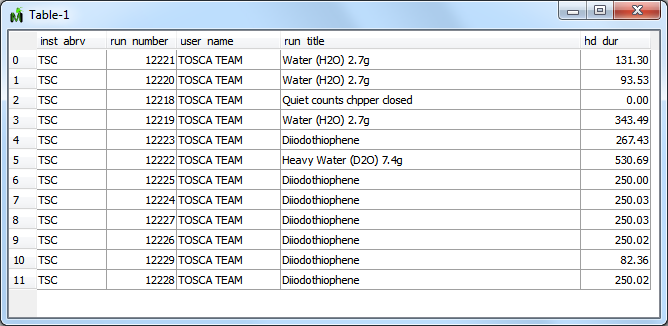
Output workspace generated by loading TOSCA runs 12218-12229, and feeding the resulting workspace names into the algorithm, along with the property names “inst_abrv”, “run_number”, “user_name”, “run_title” and “hd_dur”.#
Usage#
#create some workspaces
a=CreateWorkspace(DataX='1,2',DataY='1',WorkspaceTitle='Workspace a')
AddSampleLog(Workspace=a,LogName='ImportantParameter',LogText='1',LogType='Number')
b=CreateWorkspace(DataX='1,2',DataY='1',WorkspaceTitle='Workspace b')
AddSampleLog(Workspace=b,LogName='ImportantParameter',LogText='2',LogType='Number')
c=CreateWorkspace(DataX='1,2',DataY='1',WorkspaceTitle='Workspace c')
AddSampleLog(Workspace=c,LogName='ImportantParameter',LogText='3',LogType='Number')

#apply algorithm
tab=CreateLogPropertyTable(InputWorkspaces='a,b,c',LogPropertyNames='run_title,ImportantParameter')

#do some tests
print("Column names are:  {}".format(tab.getColumnNames()))
print("The values of the ImportantParameter are: {}".format(tab.column(1)))
Output:
Column names are:  ['run_title', 'ImportantParameter']
The values of the ImportantParameter are: ['1', '2', '3']
Categories: AlgorithmIndex | Utility\Workspaces
Source#
C++ header: CreateLogPropertyTable.h
C++ source: CreateLogPropertyTable.cpp