

MSDFit v1#
Summary#
Fits Intensity vs Q for 3 models to obtain the mean squared displacement.
Properties#
Name |
Direction |
Type |
Default |
Description |
|---|---|---|---|---|
InputWorkspace |
Input |
Mandatory |
Sample input workspace |
|
Model |
Input |
string |
Gauss |
Model options : Gauss, Peters, Yi. Allowed values: [‘Gauss’, ‘Peters’, ‘Yi’] |
XStart |
Input |
number |
0 |
Start of fitting range |
XEnd |
Input |
number |
0 |
End of fitting range |
SpecMin |
Input |
number |
0 |
Start of spectra range to be fit |
SpecMax |
Input |
number |
0 |
End of spectra range to be fit |
OutputWorkspace |
Output |
Mandatory |
Output mean squared displacement |
|
ParameterWorkspace |
Output |
Output fit parameters table |
||
FitWorkspaces |
Output |
WorkspaceGroup |
Output fitted workspaces |
Description#
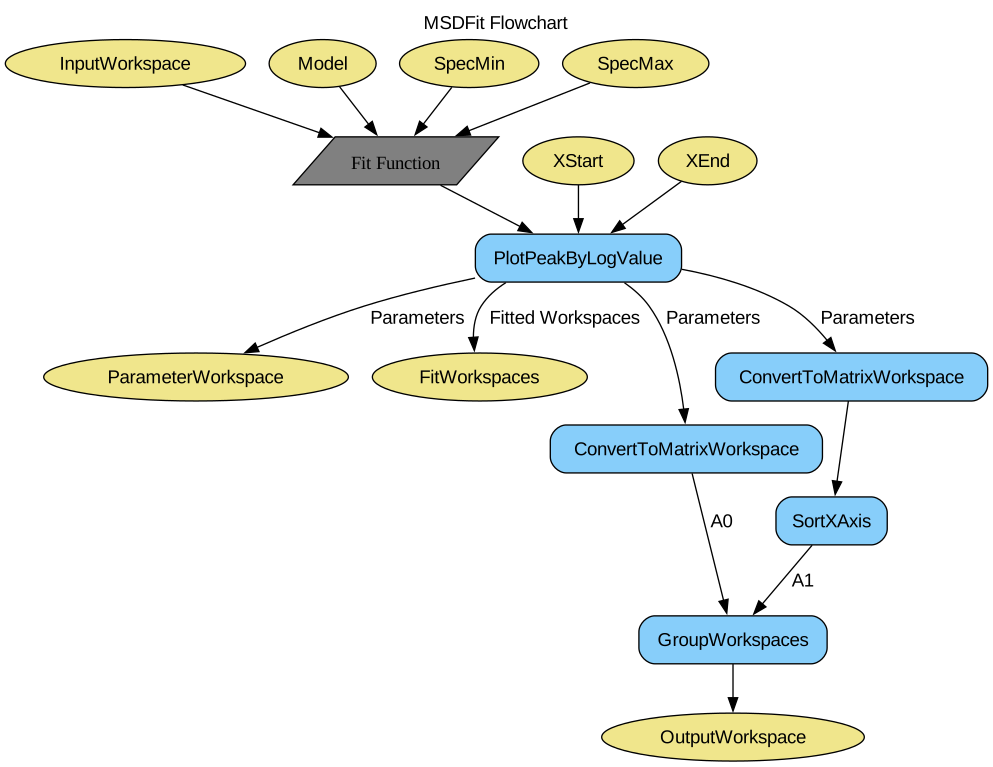
Fits \(intensity\) vs \(Q\) with a straight line for each run to obtain the mean square displacement for a given range of runs.
This algorithm operates on the \(Q\) workspace (_eq) generated by the ElasticWindowMultiple algorithm.
The model used for obtaining the mean squared displacement can be selected. These models include ‘Gaussian’, ‘Peters’, ‘Yi’.
Workflow#
Usage#
Example - Performing MSDFit on simulated data.
# Create some data that is similar to the output of ElasticWindowMultiple
sample = CreateSampleWorkspace(Function='User Defined',
                UserDefinedFunction='name=ExpDecay,Height=1,Lifetime=6',
                NumBanks=1, BankPixelWidth=1, XUnit='momentum', XMin=0.0,
                XMax=5.0, BinWidth=0.1)

g_msd, g_param, g_fit = MSDFit(InputWorkspace=sample,
                               Model="Gauss",
                               XStart=0.0, XEnd=5.0,
                               SpecMin=0, SpecMax=0)

y_msd, y_param, y_fit = MSDFit(InputWorkspace=sample,
                               Model="Yi",
                               XStart=0.0, XEnd=5.0,
                               SpecMin=0, SpecMax=0)

print('Using Gauss Model')
print('A0: ' + str(g_msd.y(0)))
print('A1: ' + str(g_msd.y(1)))
print('Using Yi Model')
print('A0: ' + str(y_msd.y(0)))
print('A1: ' + str(y_msd.y(1)))
Output (the numbers on your machine my not match exactly):
  Using Gauss Model
  A0: [...]
  A1: [...]
  Using Yi Model
  A0: [...]
  A1: [...]
Categories: AlgorithmIndex | Workflow\MIDAS
Source#
Python: MSDFit.py