

ReflectometryILLConvertToQ v1#
Summary#
Converts a reflectivity workspace from wavelength to momentum transfer.
See Also#
ReflectometryILLPolarizationCor, ReflectometryILLPreprocess, ReflectometryILLSumForeground, ReflectometryMomentumTransfer, ReflectometryILLAutoProcess
Properties#
Name |
Direction |
Type |
Default |
Description |
|---|---|---|---|---|
InputWorkspace |
Input |
Mandatory |
A reflectivity workspace in wavelength to be converted to Q. |
|
OutputWorkspace |
Output |
Mandatory |
The input workspace in momentum transfer. |
|
SubalgorithmLogging |
Input |
string |
Logging OFF |
Enable or disable child algorithm logging. Allowed values: [‘Logging OFF’, ‘Logging ON’] |
Cleanup |
Input |
string |
Cleanup ON |
Enable or disable intermediate workspace cleanup. Allowed values: [‘Cleanup ON’, ‘Cleanup OFF’] |
DirectForegroundWorkspace |
Input |
Mandatory |
Summed direct beam workspace. |
|
GroupingQFraction |
Input |
number |
Optional |
If set, group the output by steps of this fraction multiplied by Q resolution |
ThetaCorrection |
Input |
Theta correction factors from gravity correction. |
Description#
This algorithm is the last step in ILL’s TOF specular reflectometry reduction workflow. Its main purpose is to convert a reflectivity workspace from wavelength to momentum transfer. This is achieved by ReflectometryMomentumTransfer which also computes the \(Q_{z}\) resolution. Further, histogrammed InputWorkspace is converted to point data by ConvertToPointData and, optionally, the points are grouped according to the \(Q_{z}\) resolution.
If the instrument is FIGARO, and ThetaCorrection property is defined, the second step of the gravity correction is performed, where the gravity-corrected reflection angle is taken into account, and the X-axis transformed to momentum exchange replaces the X-axis of the OutputWorkspace.
The diagram below shows the workflow of this algorithm:
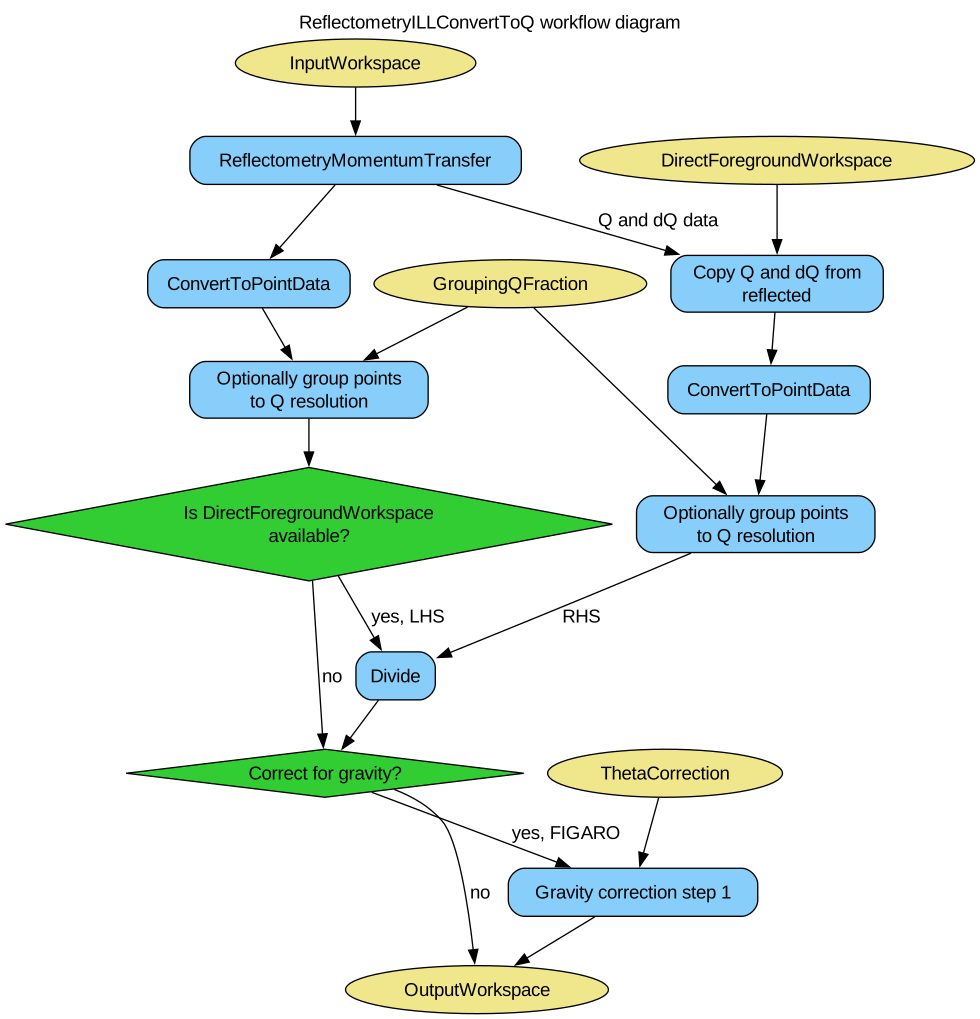
The algorithm expects to find a foreground.summation_type entry in the InputWorkspace’s sample logs containing either SumInLambda or SumInQ. This entry is automatically added to the workspace by ReflectometryILLSumForeground.
Usage#
Note
To run these usage examples please first download the usage data, and add these to your path. In Mantid this is done using Manage User Directories.
Example - nonpolarized reduction
# Use same foreground and background settings for direct and reflected
# beams.
# Python dictionaries can be passed to algorithms as 'keyword arguments'.
settings = {
    'ForegroundHalfWidth':[5],
    'LowAngleBkgOffset': 10,
    'LowAngleBkgWidth': 20,
    'HighAngleBkgOffset': 10,
    'HighAngleBkgWidth': 50,
}

# Direct beam
direct = ReflectometryILLPreprocess(
    Run='ILL/D17/317369.nxs',
    **settings
)
directFgd = ReflectometryILLSumForeground(
    Inputworkspace=direct,
    WavelengthRange=[2, 15])

# Reflected beam
reflected = ReflectometryILLPreprocess(
    Run='ILL/D17/317370.nxs',
    Measurement='ReflectedBeam',
    **settings
)

reflectivityLambda = ReflectometryILLSumForeground(
    InputWorkspace=reflected,
    DirectForegroundWorkspace=directFgd,
    DirectLineWorkspace=direct,
    WavelengthRange=[2, 15],
)
directFgd = "{}_rebinned".format(directFgd)  # direct beam is rebinned to reflected beam
reflectivityQ = ReflectometryILLConvertToQ(
    InputWorkspace=reflectivityLambda,
    # The next line is not needed if SumInQ was used in foreground summation
    DirectForegroundWorkspace=directFgd,
    GroupingQFraction=0.4
)

# The data is now in Q
print('Reflectivity X unit: ' + reflectivityQ.getAxis(0).getUnit().unitID())
print('Is reflectivityLambda histogram? {}'.format(reflectivityLambda.isHistogramData()))
print('Is reflectivityQ histogram? {}'.format(reflectivityQ.isHistogramData()))
print('Number of bins in reflectivityLambda: {}'.format(len(reflectivityLambda.x(0))))
# There is a lot less points due to grouping
print('Number of points in reflectivityQ: {}'.format(len(reflectivityQ.x(0))))
# The Q resolution is saved in the Dx field
print('Has reflectivityQ Dx? {}'.format(reflectivityQ.hasDx(0)))
Output:
Reflectivity X unit: MomentumTransfer
Is reflectivityLambda histogram? True
Is reflectivityQ histogram? False
Number of bins in reflectivityLambda: 416
Number of points in reflectivityQ: 259
Has reflectivityQ Dx? True
Example - polarized reduction
# Use same foreground and background settings for direct and reflected
# beams.
# Python dictionaries can be passed to algorithms as 'keyword arguments'.
settings = {
    'ForegroundHalfWidth':[5],
    'LowAngleBkgOffset': 10,
    'LowAngleBkgWidth': 20,
    'HighAngleBkgOffset': 10,
    'HighAngleBkgWidth': 50,
}

# Direct beam
direct = ReflectometryILLPreprocess(
    Run='ILL/D17/317369.nxs',
    **settings
)
# For reflected angle calibration:
directFgd = ReflectometryILLSumForeground(
    InputWorkspace=direct,
    WavelengthRange=[2, 15]
)
ReflectometryILLPolarizationCor(
    InputWorkspaces='directFgd',
    OutputWorkspace='pol_corrected_direct',  # Name of the group workspace
    EfficiencyFile='ILL/D17/PolarizationFactors.txt'
)

# Reflected beam. Flippers set to '++'
reflected11 = ReflectometryILLPreprocess(
    Run='ILL/D17/317370.nxs',
    Measurement='ReflectedBeam',
    **settings
)

reflectivity11 = ReflectometryILLSumForeground(
    InputWorkspace=reflected11,
    DirectForegroundWorkspace='pol_corrected_direct_++',
    DirectLineWorkspace=direct,
    WavelengthRange=[2, 15]
)
# Reload the reflected beam. We will fake the '--' flipper settings
reflected00 = ReflectometryILLPreprocess(
    Run='ILL/D17/317370.nxs',
    Measurement='ReflectedBeam',
    **settings
)

reflectivity00 = ReflectometryILLSumForeground(
    InputWorkspace=reflected00,
    DirectForegroundWorkspace='pol_corrected_direct_++',
    DirectLineWorkspace=direct,
    WavelengthRange=[2, 15]
)
# Overwrite sample logs
replace = True
logs = reflectivity00.mutableRun()
logs.addProperty('Flipper1.state', '-', replace)
logs.addProperty('Flipper1.stateint', 0, replace)
logs.addProperty('Flipper2.state', '-', replace)
logs.addProperty('Flipper2.stateint', 0, replace)

# Polarization efficiency correction
# The algorithm will think that the analyzer was off.
ReflectometryILLPolarizationCor(
    InputWorkspaces='reflectivity00, reflectivity11',
    OutputWorkspace='pol_corrected',  # Name of the group workspace
    EfficiencyFile='ILL/D17/PolarizationFactors.txt'
)
# The polarization corrected workspaces get automatically generated names
polcorr00 = mtd['pol_corrected_--']
polcorr11 = mtd['pol_corrected_++']

R00 = ReflectometryILLConvertToQ(
    InputWorkspace=polcorr00,
    # The next line is not needed if SumInQ was used in foreground summation
    DirectForegroundWorkspace='pol_corrected_direct_++_rebinned',
    GroupingQFraction=0.4
)
R11 = ReflectometryILLConvertToQ(
    InputWorkspace=polcorr11,
    # The next line is not needed if SumInQ was used in foreground summation
    DirectForegroundWorkspace='pol_corrected_direct_++_rebinned',
    GroupingQFraction=0.4
)

print('X unit in R00: ' + R00.getAxis(0).getUnit().unitID())
print('Number of points in R00: {}'.format(len(R00.x(0))))
print('X unit in R11: ' + R11.getAxis(0).getUnit().unitID())
print('Number of points in R11: {}'.format(len(R11.x(0))))
print('Size of Q resolution data: {}'.format(len(R11.dx(0))))
Output:
X unit in R00: MomentumTransfer
Number of points in R00: 259
X unit in R11: MomentumTransfer
Number of points in R11: 259
Size of Q resolution data: 259
Categories: AlgorithmIndex | ILL\Reflectometry | Workflow\Reflectometry
Source#
Python: ReflectometryILLConvertToQ.py